


Using our DataSymbol Web SDK as an example.
Let’s say you have a label with several barcodes printed on it at the same time.
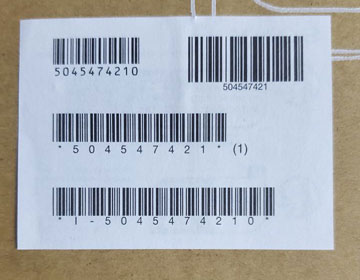
If you point the barcode scanner camera at such a label, it’s unclear which barcode will be decoded. But what should you do if, for example, you only need to scan the barcode containing the serial number?
Of course, you could try to aim the camera only at the required barcode or cover the others — but this is very inconvenient.
Our Barcode Scanner Web SDK provides a setting called barcodeAtPoint.
By default, this parameter is set to false. However, if you set it to true, a crosshair will appear on the barcode scanner screen. Using this crosshair, you can scan only one barcode out of several.
If the crosshair is positioned over the barcode you need, the scanner will fire an event indicating that the barcode has been successfully decoded. All other barcodes that are decoded but do not fall within the crosshair will not trigger the onBarcode event.
Here is a short video demonstrating how this works.
Click here to test this feature online (to display the crosshair, click the Scanner icon and then toggle the “Barcode at Point” switch):
https://websdk.datasymbol.com/
Ready to get started?






One response to “How to Scan a Single Barcode When Multiple Barcodes Are Present”
[…] the previous post, we explained how to decode only one barcode out of several. However, decoding all barcodes on a […]